Activate Your Premium Plan
Self-help guide for users who purchased a plan and need to activate it manually.
Don't have a subscription yet? View pricing & plans.
Go to activation page →1. Daily FuelBill Plan
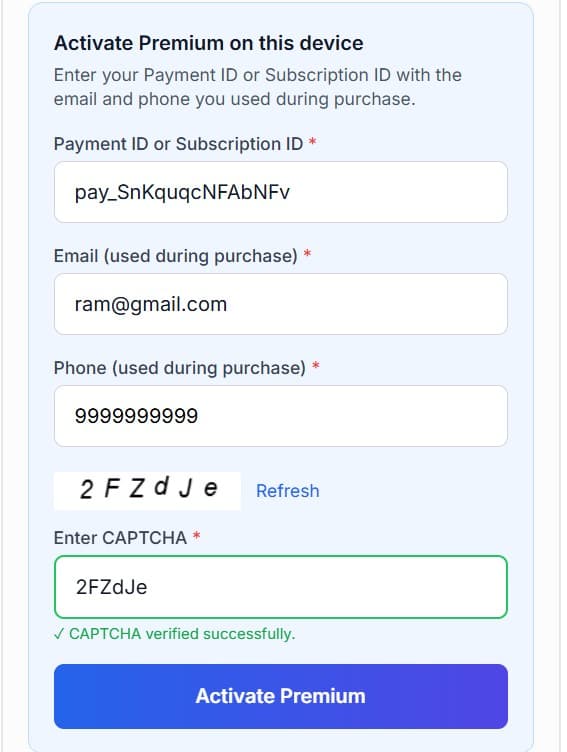
Activate your 1-day or daily fuel bill plan on this device via Manage Subscription.
- Use the same device (or browser) you used when purchasing.
- Navigate — Open Manage Subscription.
- Enter Payment ID — Paste your Payment ID (starts with
pay_) ie pay_SxXxWuMCYOwCWr from your payment email. - Enter email & phone — Use the same email and phone used during purchase.
- Verify — Complete the CAPTCHA and click Activate Premium.
- Confirm — The page will show your plan and validity date after activation.
After activation: Validity dates (e.g. "Active until…") are shown in the green success box on the same page.
What if my plan doesn't show after activation?
Use the same device and browser you used to pay. Clear cache and reload the Manage Subscription page. If it still doesn't show, contact support with your Payment ID.
2. FREEDOM Plan (Unlimited Receipts)
Activate unlimited rent receipts with one-time payment. Activation is instant once your Payment ID is verified.
- Benefits: Cost savings vs monthly, extended validity, unlimited watermark-free receipts.
- Use the device you used when purchasing.
- Navigate — Go to Premium Active or Manage Subscription (or the activation link from your email).
- Enter Subscription ID — Enter the Subscription starts with
sub_like (sub_S4CbLMHXpwpnz7) from your purchase confirmation. - Verify — Enter email and phone used at purchase, complete CAPTCHA, then click Activate Premium.
- Confirm — Activation is instant once the Payment ID is verified; you can use unlimited receipts immediately.
What if activation says plan expired?
FREEDOM plans have a validity period. If you see an expiry message, ensure you're using the correct Payment ID and that the plan hasn't expired. Contact support with your Payment ID if needed.
3. Rent Receipt / Driver Salary Plan
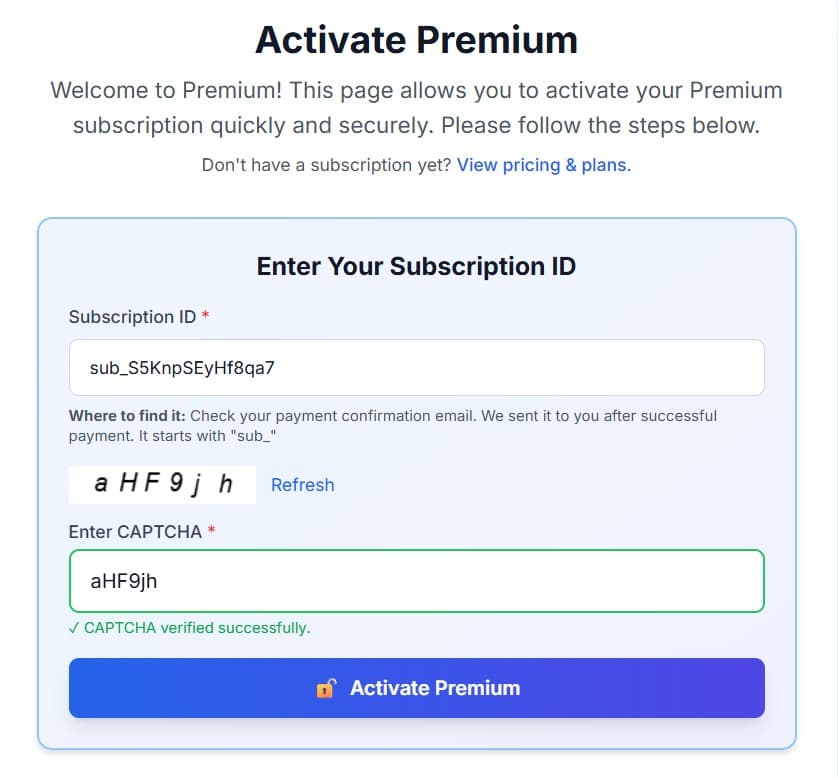
Activate compliance-ready rent receipts or driver salary slips. Use your Subscription ID (sub_xxx) on the activation page.
- Login — Use the same device/browser for consistency.
- Navigate — Open the Activate page (or use the link from your confirmation email).
- Enter Subscription ID — Enter your Subscription ID (starts with
sub_) like (sub_S4CbLMHXpwpnz7) from the payment email. - Verify — Complete the CAPTCHA and click Activate Premium.
- Confirm — Once verified, you can generate and download compliance-ready receipts (with PAN and revenue stamp logic where applicable).
PAN & revenue stamp: Rent and driver salary templates apply PAN and revenue stamp rules as per Indian tax norms. Options are available on the receipt generator page after activation.
Download after activation: Go to Rent Receipt or Driver Salary Slip, fill the form, and download your PDF.
What if my plan doesn't show after activation?
Hard refresh the page (Ctrl+F5 or Cmd+Shift+R). Ensure you're not in private/incognito mode. If it still doesn't show, contact support with your Subscription ID.
Quick reference
- • Daily FuelBill / FREEDOM → Manage Subscription (Payment ID
pay_) - • Rent / Driver Salary → Activate (Subscription ID
sub_)
FAQ: Plan not working after purchase
- I paid but my plan still doesn’t show as active. What should I do?
- Use the same device and browser you used when paying. Open Manage Subscription for Fuel Bill (enter Payment ID
pay_) or Activate for FREEDOM / Rent / Driver (enter Subscription IDsub_). Clear cache and do a hard refresh (Ctrl+F5 or Cmd+Shift+R). If it still doesn’t work, contact us with your Payment ID or Subscription ID from the confirmation email. - Activation says “invalid” or “plan expired”. Why?
- Check that you’re entering the ID exactly as in your email (copy-paste is best). Payment IDs start with
pay_, Subscription IDs withsub_. For 1-day or FREEDOM plans, the validity period may have ended—ensure the plan hasn’t expired. If you’re sure the ID and dates are correct, contact support with your Payment/Subscription ID. - I activated on this device but premium features are still locked.
- Avoid private or incognito mode—activation is tied to your browser. Close all tabs of the site, clear cache, then open the activation or manage page again and re-enter your ID. If you switched device or browser, activate again on the new device using the same Payment/Subscription ID from your email.